Red Urchin is built around a single To Do Today page. Everything below exists to keep that page accurate without double entry.
Every feature below exists to do one of three jobs: get the heavy work in before the noise, rank what's left, or hand you a single thing to focus on.
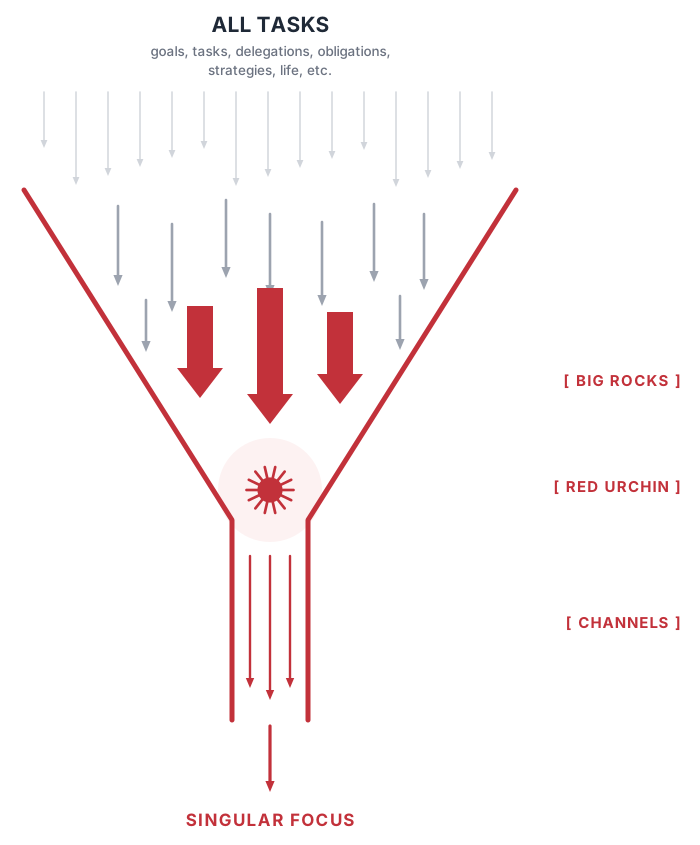
Big rocks go in first. Goals, recurring tasks and calendar-linked meetings claim their place before the small stuff arrives. Put them in last and they never fit at all.
Red Urchin ranks the rest. Everything you capture — tasks, follow-ups, delegations, notes — lands on one To Do Today page, takes an A/B priority, and reorders itself with a single click of the urchin button.
Channels deliver one thing at a time. Your page tells you the next action, not all forty of them. Finish it, mark it complete, move to the next.
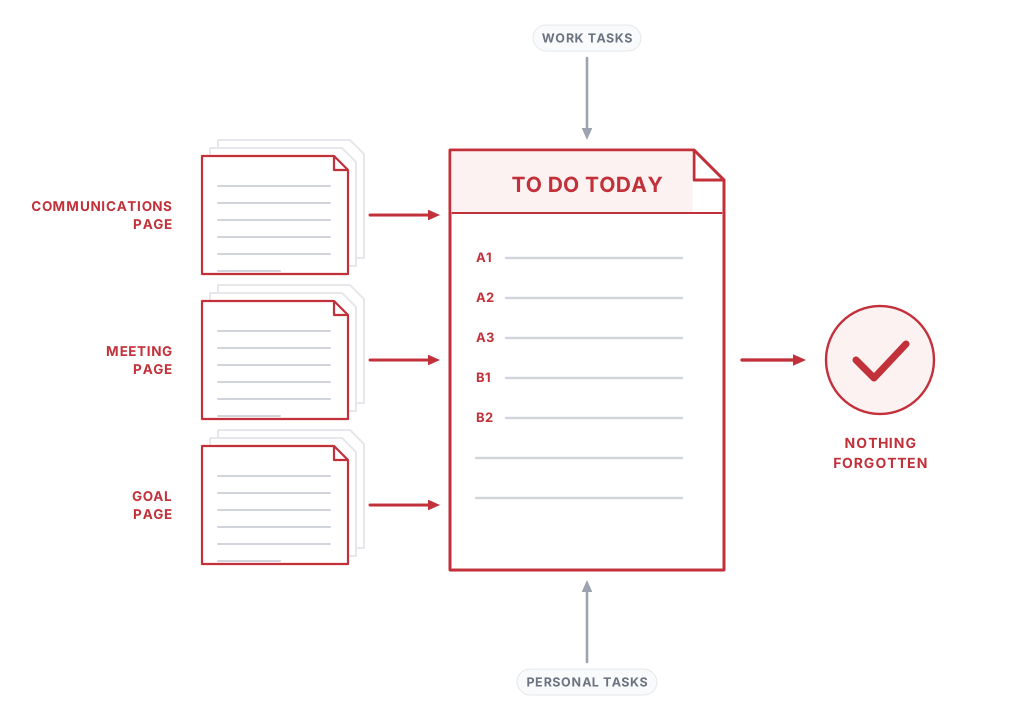
A dedicated virtual page for every date — the central place your day starts and ends.
Main, Outside Activities and Due From Others — same functionality in each, split so your own work and the work you're waiting on never blur together. Put a delegate against a row and you can see at a glance who owes you what.
Set A1, B2 and so on. Insert a duplicate priority and every other row renumbers itself — no manual reshuffling.
Reorder any row, or drag a task onto a date in the rail to move it — priority clears automatically on the move.
Your linked calendar (Google or Microsoft 365) beside your tasks — working hours by default, scrollable to 24 hours, all-day items pinned to the top, overlapping meetings side by side. Click an empty slot to add an entry with an optional reminder and it's written back to your real calendar; meetings you've logged appear here too.
Mark complete, move to date, set font colour, change reference, set recurring, add a calendar entry, or delete — all from one menu.
Attach documents to any row via the paperclip icon, kept with the entry through moves and recurrence.
Put a duration in minutes against any row. Each section header adds up the minutes still outstanding, so the page tells you how much of the day you have already committed before you say yes to anything else.
Type C, G, M or N in the Ref cell, pick the page, and the row takes a short code derived from it — C/BJ for a Communications page called Bob Jones. The code is a live link straight back to that page.
The urchin button strips blank rows and re-sorts each section — unfinished first, A1 → A → B1 → B → unprioritised, completed below. The lowest unfinished A in each section stays bold: the one thing to do next.
Smaller details on the same page
Purpose-built pages that write straight back to your To Do Today list — and read back from it. Tick the task off on your daily page and the follow-up row on the call, meeting or goal it came from ticks off too. Nothing is tracked in two places, and nothing is updated twice.
Log type, date, subject and outcome for every call, email or conversation. The follow-up (F/U) button opens a mini calendar, creates the task on the day you pick, and marks whether it's your action or due back from someone else.
Action, delegate, resources, start date and duration per goal, with a time-activate setting that creates the task on your TDT page exactly when it's due.
Agenda items with type, outcome and owner, automatic calendar entries, an outcomes section, and F/U items that flow to the right person's TDT page.
A full rich-text notes page per subject, separate from the daily notes box on your TDT page.
Link a Google or Microsoft 365 contact to a Communications page and it becomes the source of truth — name, phone, email and address update automatically, no re-typing.
Every subpage has a sortable, searchable summary — active items grouped first. Toggle any subpage inactive to grey it out and lock it, without losing the history.
Set any task to repeat daily, weekly, monthly or yearly, in any combination — every instance carries its priority, reminders and attachments with it, just like a calendar recurrence. Edit an occurrence and you get the choice a calendar gives you: this task only, or this and every future one. Each day can hold its own priority for the same recurring task, because Tuesday's version of a job isn't always as urgent as Friday's.
Automatic Task Forwarding (in Settings) moves every uncompleted task from before a date you choose onto a new date, so nothing quietly falls off the list. Missed occurrences of recurring tasks come across too, each one labelled with the date it was originally due — so a fortnight of skipped gym sessions arrives honestly, rather than disappearing.
One search box covers every page and subpage — tasks, subjects, notes and metadata. Results rank on match quality plus whether the page or date is still active, so live work surfaces first.
Click a result to jump straight to the page it lives on.
Sign in once — your data is centrally stored and stays current no matter which device opens it.
Runs in your browser at go.red-urchin.com — no download, no app store. Install it to your home screen or dock in two taps, and it opens and works with no connection, syncing when you are back online.
Your Google or Microsoft login stays in your browser — we never see or store it.
Print any page to PDF straight from the browser, with a dedicated export screen on the way.
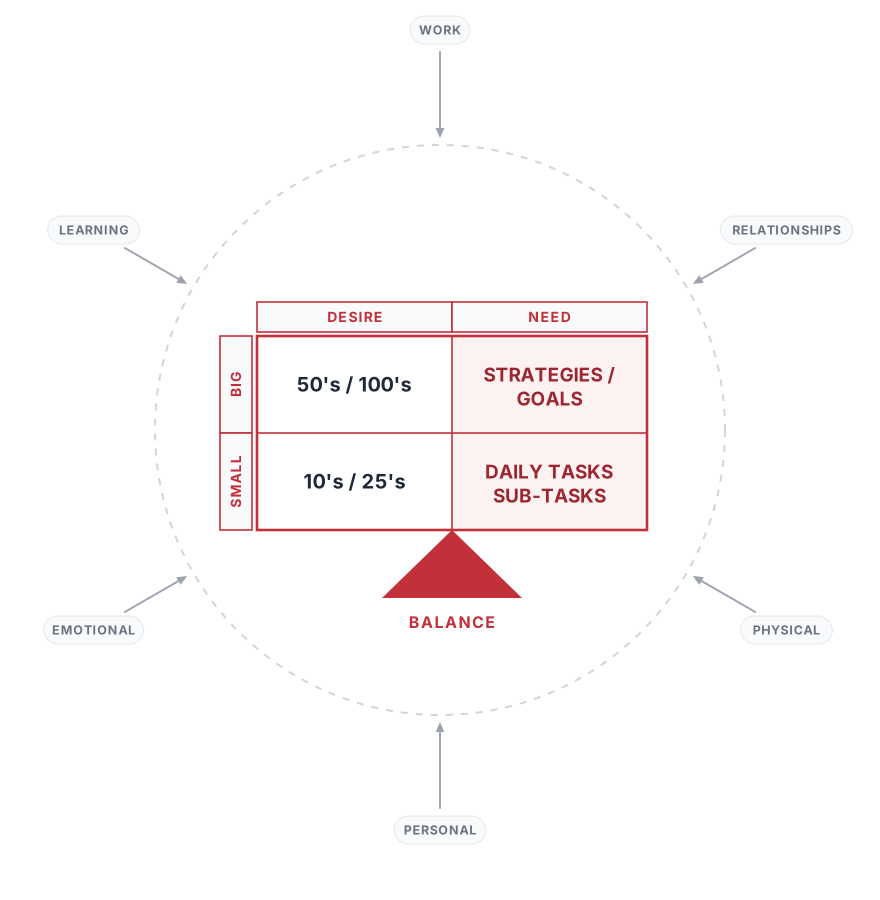
A system that only holds your job isn't holding your life. Red Urchin takes every input — work, learning, relationships, physical, emotional, personal — and sorts it on two axes: what you need to do against what you desire to do, big against small.
Strategies and goals live in Goals. Daily tasks and sub-tasks live on your To Do Today page. Your 10s, 25s, 50s and 100s get scheduled like everything else — because if you don't book them, the noise takes the time instead.
A weekly and monthly layer sitting between your long-term Goals and your daily To Do Today page — for the things that aren't a deadline, they're a frequency.
A long-term goal has a target date. A daily task has a day. Neither of those shapes fits "call three clients a week" or "two sessions at the gym" — the commitments that quietly decide how a year turns out. Micro Goals are built for exactly that shape, on their own page, with a weekly section and a monthly one.
Give a goal a target of up to seven for the period and each one becomes a box. Click a box and Time Activate turns it into a real task on a date you choose inside that week or month, in either your Main or Outside Activities section. It isn't a tick in a tracker — it's a row on a specific day, sitting in the priority order with everything else competing for that day.
Status is never entered twice. A box turns grey the moment its task is scheduled and red the moment that task is completed on your To Do Today page, read live from the task itself. Delete the task on your daily page and the box quietly returns to waiting, because there's only ever one source of truth. Delete the whole micro-goal and any tasks it created are cleaned up with it.
Page back and forward through weeks and months to see what a period actually looked like. Starting a fresh one? Copy brings the previous period's goals forward in a click — titles and target counts only, never the completions, so you start the week honest.
completed scheduled still to find a day
No charge for 14 days. Cancel any time before it ends.